For game developers
3D File Formats for Games: GLB vs FBX vs OBJ vs BLEND

Short answer: for game development, four 3D file formats cover almost every need. GLB (binary glTF) packs meshes, materials and textures into one file and is what Godot recommends. FBX is the format Unity's import pipeline is built around. OBJ is the simple, universal fallback that stores geometry and a basic material, but no pivots or hierarchy. A .blend file is the editable Blender source. Pick by engine, then keep the others as backups.
This explainer compares the formats using real files from our own game asset packages, opened and inspected in October 2026, alongside the official Unity and Godot documentation. Every game kit in our game assets department ships as BLEND, GLB, FBX and OBJ, so the differences below are things you can check in a download rather than theory.
The four formats at a glance
Most format guides list dozens of extensions, including STL, 3MF and STEP for printing and CAD. For a game project the useful list is much shorter. The table summarizes what each of the four formats carries, based on the format specifications and the engine documentation cited below.
| Format | What it is | Hierarchy and pivots | Materials and textures | Typical game use |
|---|---|---|---|---|
| GLB | Binary form of glTF, an open Khronos standard for real-time 3D | Yes, full node tree with transforms | PBR materials; textures can be embedded in the same file | Godot, web engines such as three.js, AR and VR viewers |
| FBX | Autodesk interchange format, binary or ASCII | Yes, node tree with transforms | Materials; textures embedded or referenced as separate files | Unity, Unreal Engine, most DCC tools |
| OBJ + MTL | Plain-text Wavefront geometry with a companion material file | Named objects, but no pivots, no hierarchy, no animation | Basic material referencing image files by name | Fallback import, quick previews, older tools |
| BLEND | Native Blender project file | Everything Blender stores, including modifiers and collections | Full node-based materials | Editing, re-exporting with your own settings |
The practical rule follows from the hierarchy column. If a model has moving parts, such as a door on a hinge, it needs a format that keeps pivots: GLB or FBX. If it is a single static mesh, any of the four will work.
What is actually inside each file: a real example
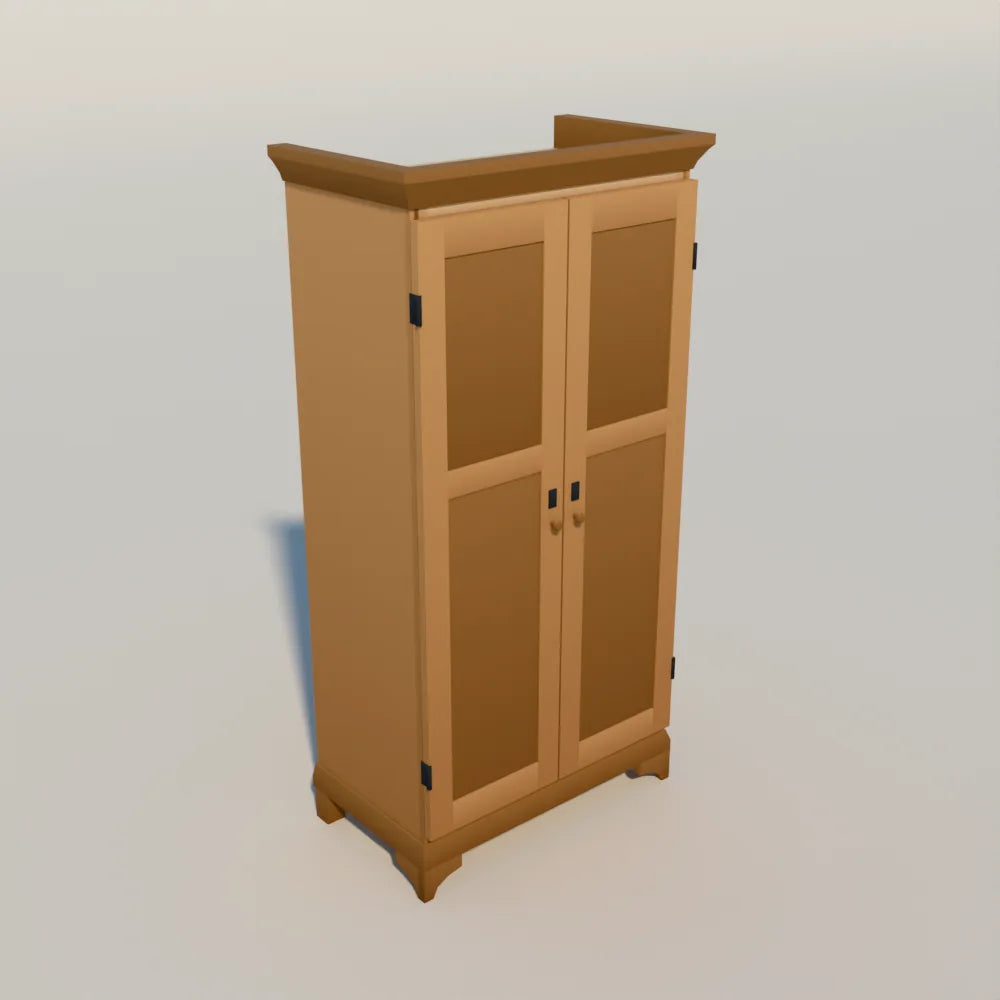
Format comparisons are easier to follow with one model in all four formats. Here is what the delivered files for the Oak Two-Door Wardrobe contain. It measures 1.00 by 0.58 by 1.95 m and has 1,064 triangles, according to its product page.
| File | Size | What we found inside |
|---|---|---|
| asset.glb | about 188 KB | The wardrobe body, left and right doors as separate nodes with their pivots on the hinge line, the collision proxy, one material, and both atlas images (color and emissive) embedded |
| asset.fbx | about 48 KB | The same nodes, including the collision proxy and the two doors, with the atlas referenced as separate image files rather than embedded |
| asset.obj + asset.mtl | about 68 KB + a few hundred bytes | The body and both doors as named objects, triangulated; no pivots and no collision proxy; the MTL points at the two atlas PNGs by file name |
| LV_Atlas.png, LV_Atlas_emissive.png | about 112 KB and 5 KB | The shared 512 px gradient atlas and its emissive companion, used by the FBX and OBJ |
Three differences stand out. The GLB is the largest single file because the textures live inside it, which also makes it the easiest to move around: one file and nothing to relink. The FBX is small because it leaves the textures next to it, so you need to keep the PNGs in the same folder when you import. And the OBJ keeps the doors as separate objects but loses where they rotate from, so you would have to set the hinge pivots again by hand.
Every model in the Larkspur kits shares that one atlas. If you want to know why one small image can color a whole farmhouse, our texture atlas explainer walks through it cell by cell.
FBX vs OBJ
This is the most searched comparison, and the answer for games is short: use FBX when you can, OBJ when you must. OBJ is a text format from the era of offline rendering. It stores vertices, UVs, normals, faces and named groups, plus a reference to an MTL file that describes a simple material. That simplicity is why almost every tool can read it. It is also why it cannot carry pivots, parent and child relationships, skeletons or animation.
The material side shows the gap clearly. The Oak Ale Barrel from Hearth & Hollow ships with three small palette textures: base color, emissive, and a metal and roughness map. Its GLB material uses all three. Its MTL file references the base color and emissive images, because the classic MTL material has no standard slot for a combined metal and roughness map. If you import the OBJ, assign that third map yourself to match the GLB.
FBX keeps the scene structure and supports richer materials, and it can embed textures. Our Hearth & Hollow FBX files carry their palette images inside the file, while the Larkspur FBX files reference the shared atlas next to them. Both approaches are valid; check which one a pack uses before you move files between folders.

glTF and GLB vs FBX
glTF is an open standard maintained by the Khronos Group, designed for efficient delivery of real-time 3D. GLB is its binary container. The specification fixes a few conventions that FBX leaves to the exporter: units are meters and +Y is up. That matters when a model comes from Blender, which works with Z up. Our collection plans record each asset in meters with Z up in Blender, and the GLB export converts to Y up, so the model stands upright without a manual rotation.
FBX is older and owned by Autodesk, but it is deeply embedded in game pipelines. The Unity manual describes FBX as the format its own importing chain is built on and advises exporting to FBX rather than shipping proprietary files. Unity reads FBX, DAE, DXF and OBJ as standard formats. For Hearth & Hollow, our product page states that the included assets were tested in Unity via FBX with the Built-in render pipeline.
The Godot documentation takes the other side: it lists glTF as the recommended format, in both .gltf text and .glb binary form, and notes that a GLB includes the mesh and textures set up in Blender. Godot also imports FBX through a bundled library and OBJ with MTL, while describing OBJ as limited, with no support for pivots, skeletons, animations, a second UV channel or PBR materials.
So the choice is mostly made by your engine. For Unity, start with the FBX. For Godot or a web engine, start with the GLB. Keep the other as a backup if an import misbehaves.
Which format should you use?
| Your situation | Start with | Why |
|---|---|---|
| Unity project | FBX | Unity's documentation names FBX as the format its importer is built around |
| Godot project | GLB | Godot's documentation lists glTF as recommended and GLB carries textures inside |
| Web or WebXR scene | GLB | One compact file with embedded textures loads in a single request; see our WebXR guide |
| Static prop in an older or unusual tool | OBJ | Read almost everywhere; fine when there are no moving parts |
| You want to change the model | BLEND | Edit in Blender, then export with your own engine settings |
A few habits save time whatever you pick. Keep each asset's files and textures together in one folder until the import is done. Check the scale on import: a 1.95 m wardrobe should come in at roughly the height of a door frame, not a hundred times larger. And look for helper meshes. Larkspur assets such as the wardrobe include a simple collision proxy, and their product pages say to hide or convert it on import; in the GLB and FBX it is a separate node you can assign to a collider.
Format is only one part of making a model ready for a game. Triangle budgets and draw calls matter as much, and our guides on how many triangles counts as low poly and what makes a 3D model game-ready cover those.
Where to find kits with all four formats
If you want to try the comparison yourself, every listing in our game catalog states the formats it includes. A few good starting points:
- Larkspur Farmstead: the complete collection has 67 assets in BLEND, GLB, FBX and OBJ on one shared 512 px gradient atlas, and the Farmhouse Interior Kit has 18 of them, including the wardrobe.
- Hearth & Hollow: the complete collection has 57 assets in all four formats with shared palette textures, plus two ready-made scenes as BLEND, GLB and FBX.
- Saltlight Village: the complete collection has 69 assets in all four formats on one shared 512 px gradient atlas.
Common questions
What is the file format for a 3D model?
There is no single one. Game engines most often use FBX or glTF (GLB), Blender saves .blend, OBJ is the common plain-text exchange format, and 3D printing uses STL or 3MF. For games, a pack that includes FBX and GLB covers the major engines.
Is STL or OBJ better?
They serve different jobs. STL stores only triangle geometry with no color or UVs, which suits 3D printing. OBJ also stores UVs, normals and a material reference, so it is the better pick when the model needs textures, as game assets do.
Can I convert between formats?
Yes. Blender opens BLEND files and can import and export GLB, FBX and OBJ. Converting from OBJ to FBX or GLB will not recover pivots or hierarchy that OBJ never stored, so convert from the BLEND, GLB or FBX when you have them.
Assets in this guide
Oak ale barrel
Containers · Hearth & Hollow
€4,00
- Asset collectionBest value
Hearth & Hollow: Complete Collection
57 assets · Hearth & Hollow
€59,00
Includes 57 assets worth €337,00 separately
- Asset collection
Larkspur Farmstead: Complete Collection
67 assets · Larkspur Farmstead
€89,00
Includes 67 assets worth €507,00 separately
- Kit
Farmhouse Interior Kit
18 assets · Larkspur Farmstead
€52,00
Includes 18 assets worth €131,00 separately
Oak Two-Door Wardrobe
Beds and bedroom · Larkspur Farmstead
€7,00
- Asset collection
Saltlight Village: Complete Collection
69 assets · Saltlight Village
€89,00
Includes 69 assets worth €490,00 separately


